theaaronloy_

Top Menu

  • Home
  • About
  • Contact
  • Disclaimer

Main Menu

  • Rants
  • Singapore
  • World
  • Life
  • Art
  • Food
  • Travels
  • Music
  • Games
  • Astronomy
  • Tech
  • Science
  • Eco
  • Business
  • Finance
  • Bargains
  • Randomness
  • Scam Watch
  • How To
Sign in / Join

Login

Welcome! Login in to your account
Lost your password?

Lost Password

Back to login
  • Home
  • About
  • Contact
  • Disclaimer

theaaronloy_

theaaronloy_

  • Rants
  • Singapore
  • World
  • Life
  • Art
  • Food
  • Travels
  • Music
  • Games
  • Astronomy
  • Tech
  • Science
  • Eco
  • Business
  • Finance
  • Bargains
  • Randomness
  • Scam Watch
  • How To
BargainsFinanceSingaporeWorld
Home›Bargains›Amazon Currency Converter – AVOID AT ALL COST


Amazon Currency Converter – AVOID AT ALL COST

By aaron loy
September 4, 2013
18121
0
Share:

acc-logo-07._V192559620_

If you’re a foreigner that’s been making purchases on Amazon, you would have noticed that they are now starting to do their own currency conversions based on your credit card’s country of issue.

“Wow! Convenient! No more poor credit card exchange rates!”, you might say.

But… please… DON’T.

It’s a bloody ripoff.

What this is, is amazon trying to squeeze more profits out of each deal by giving you shitty conversion rates.

I’ve calculated that if you were to use Amazon’s of Currency Converter’s rates, you would be charged about 4-5% more. In comparison, most credit cards you use will probably give themselves a 1-2% margin of the market’s exchange rate.

Long story short – if you use Amazon’s service, you’ll be paying a ridiculous amount in exchange fees. Avoid it.

Exceptions

From what I know, there are some companies that charges a specific fee on top of the currency exchange margins. I’ve personally only read about it once with regards to some Australian credit cards, so do give it a check and if that’s the case and if the total amount you’re spending isn’t huge, it may be a good idea to use Amazon’s currency converter.

This is not a problem for Singaporean cards.

 How To Ensure That You’re Not Getting Amazon Currency Converter Rates

1. Credit Card Currency Settings

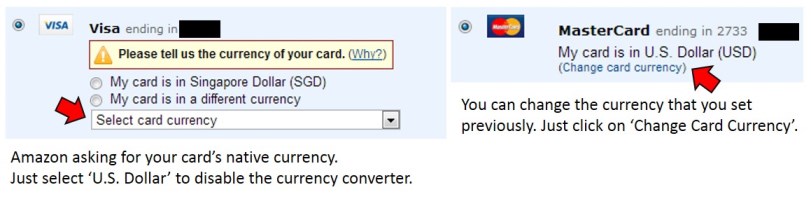
You may have noticed recently that Amazon’s been asking you to confirm the native currency of your saved credit cards. Just select USD and it will disable the currency converter once you’re at the confirm screen.
amazoncurrencyconverter1

2. ‘Switch Currency’ at Checkout Confirmationamazoncurrencyconverter2
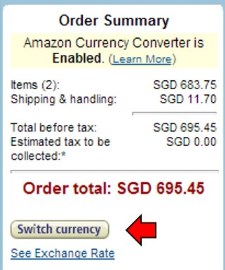
If you prefer to set the proper currencies for your cards, then the currency converter will be enabled. You can still pay in US Dollars – all you have to do is click on ‘Switch Currencies’ when you’re at the final confirmation screen, as shown by the picture at the right, and choose USD.


Amazon’s still a great way to get great products at lower prices, though it is still important to keep an eye out for shenanigans such as this.

I hope you found this useful and if you did, using the links provided will go along way in supporting this site – Thanks!

 

Tagsamazoncredit cardscurrency
Previous Article

Is This The Best Tea Infuser…In The ...

Next Article

Olympus OMD EM5 vs EM1 Size Comparison ...

0
Shares
  • 0
  • +
  • 0
  • 0
  • 0
  • 0

Related articles More from author

  • BargainsFoodSingapore

    Philips AirFryer HD9240 – Best Sale Price

    January 5, 2017
    By aaron loy
  • TravelsWorld

    Trader’s Hotel KL Review – Executive Suite, Twin Towers View, Trader’s Club

    January 13, 2014
    By aaron loy
  • BusinessRantsSingaporeTech

    How Singtel is Cheating iPhone 5 Customers. Maybe Starhub and M1 as well.

    April 18, 2013
    By aaron loy
  • Singapore

    Get the New No.4 Uniform for Free (Reservist NSmen)

    October 24, 2015
    By aaron loy
  • SingaporeTech

    XCOM: Enemy Unknown PC Pre-Order Singapore (And Asia)

    October 1, 2012
    By aaron loy
  • EcoSingapore

    Singapore Haze – Why Use N95 masks

    June 22, 2013
    By aaron loy

  • Life

    Think, When You Were Still a Kid

  • LifeRandomness

    Only a Person who Risks is Free

  • Tech

    Sony’s New Mirrorless Full Frame NEX Camera – Why It Might Work

Cheap Supplements Online Store Singapore!


Support the World Wildlife Fund

Disclaimer

This Site is User Supported: theAARONLOY// is reader-supported. When you buy through links on our site we may earn an affiliate commission.

Affiliate Links: Assume all outgoing links are affiliate links. Your price remains unchanged (you get better prices sometimes!), yet you'll be able to support the site. Also, this allows us to monetize the site without resorting to conflicting sponsorships.

Non-Sponsored Reviews: Assume all reviews/articles are not sponsored unless noted. Example: Most of my restaurant reviews are made unannounced, with food paid for by yours truly. I don't believe in PAP-style inspections and Gushcloud-ish BS.

Full disclaimer here.